CalendarTask
Put your calendar and to-dos on the desktop wallpaper, where no window can bury them
Forpeople who plan their day on a Windows PC Windows, Mac, Linux, iPhone, Android
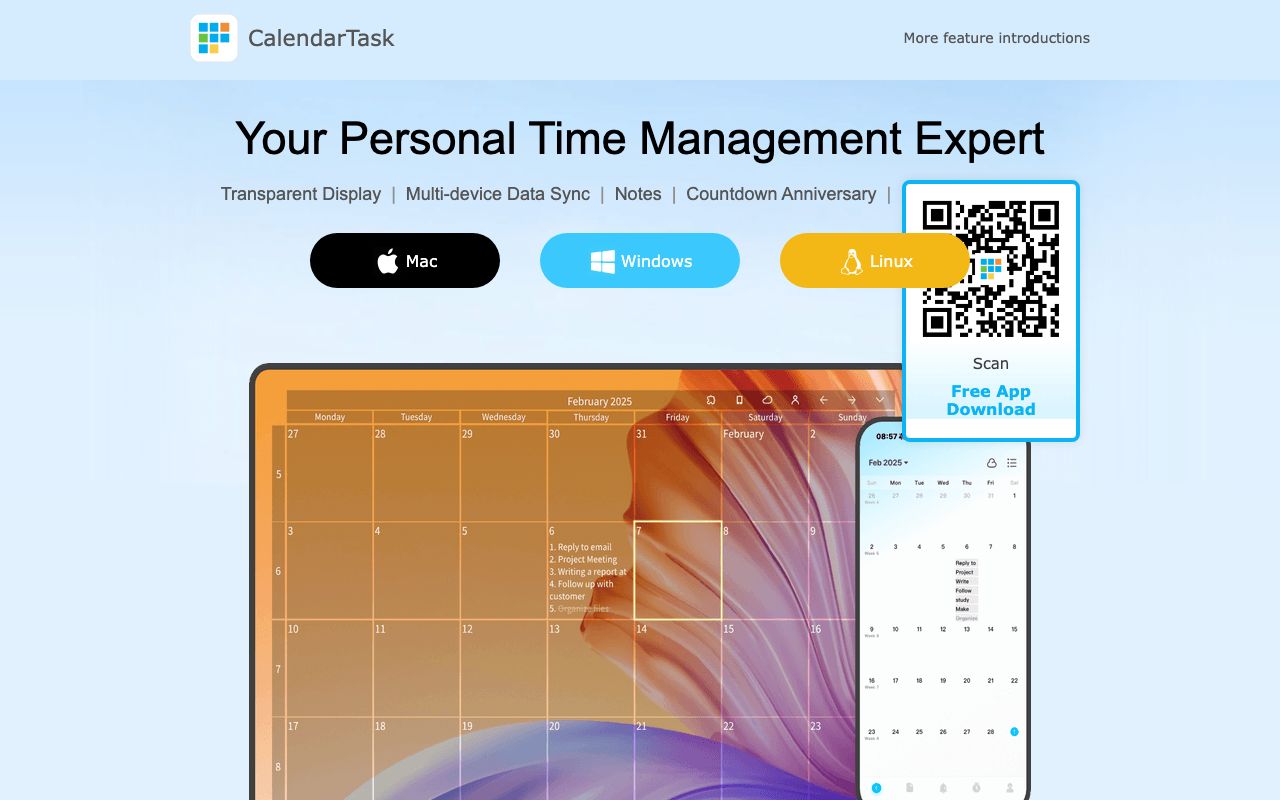
Tomorrow's appointments are checked, an email needs an answer, and the calendar sinks behind six other windows. A calendar app in its own window disappears behind whatever you are working on, and the week's appointments stay out of sight. In CalendarTask the calendar is drawn see-through onto the Windows desktop wallpaper, and the desktop icons stay clickable on top of it. You double-click a day to write a task or a note into it.
Each task can get a reminder and be ticked off when done, while recurring tasks and countdowns handle dates that come back or lie ahead. Signed in with the same account, the calendar syncs to apps for macOS, Linux, iPhone, Android and HarmonyOS phones, and schedules can be shared with a team. CalendarTask continues the older DesktopCal product under a new name, and its release notes list a Windows version dated 2026-10-20.
Good fit if you…
- want your schedule on screen without opening an app
- used DesktopCal and want its successor
Made CalendarTask? Get the badge
You're welcome to show the listing on your site. It's optional and free, and nothing about the listing depends on it.

Share the listing
More in Productivity & Collaboration
See all →
BriefPatch
Agree on scope, feedback rounds and handoff with a client before the job grows

DeckDesh
Send your pitch deck as a private link on your own website and see when it gets opened

Novastart
Keep every app on one zoomable desktop that is still set up when you come back tomorrow

Numbers2Excel
Open a spreadsheet someone made on a Mac by turning the .numbers file into Excel

Aftermath File Fixer
Shrink a video or resize a photo to fit a form, right in your browser