TypePatch
Type new words over old ones in a screenshot or photo, right in the browser
Forpeople who fix screenshots and graphics for slides, docs and mockups Web
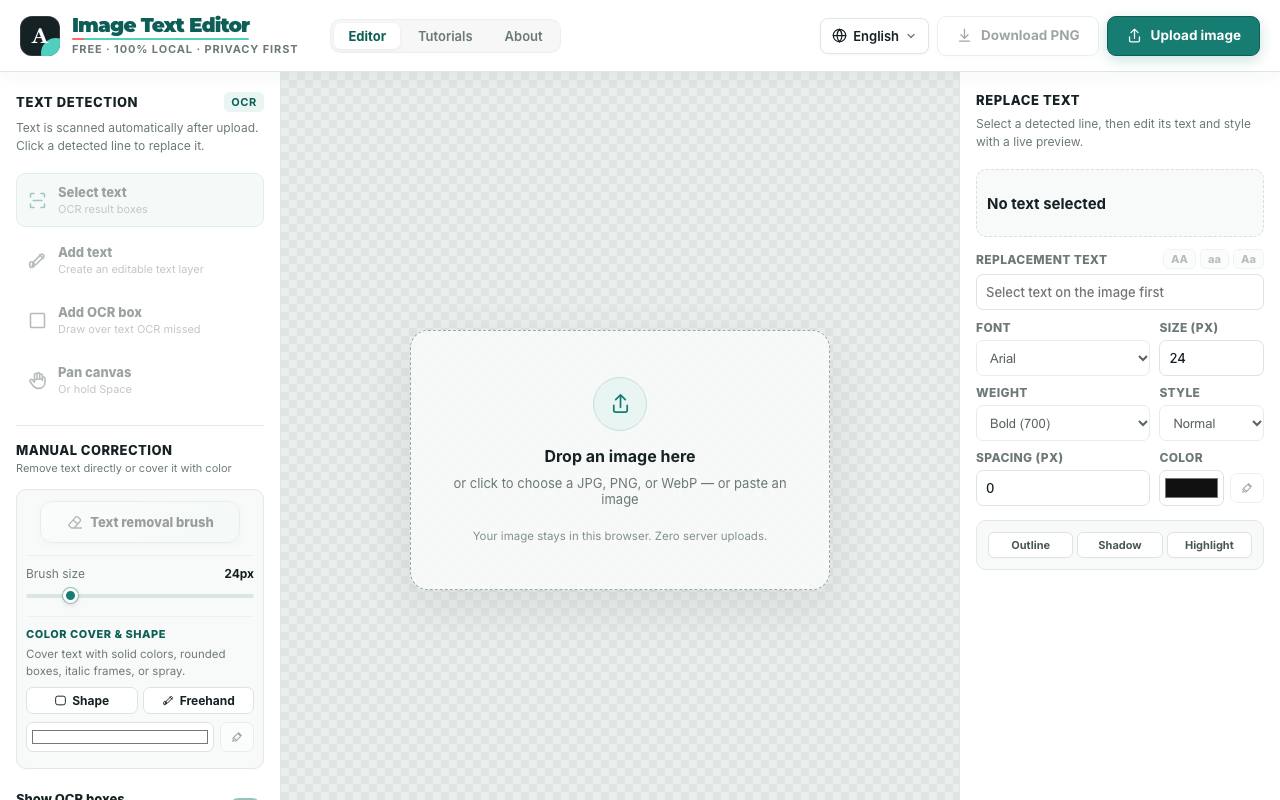
Half an hour before the meeting, someone spots last year's date in a screenshot on slide 12. TypePatch reads the words in a JPG, PNG or WebP picture and draws a box around each line it finds. Click a line and type the new wording, and the editor rebuilds the background behind the old letters first. On its own pages the tool calls itself Image Text Editor.
You give the new text a font, weight, spacing and colour, and effects such as an outline or a highlight help it match the original. Fonts for Chinese, Japanese and Korean sit next to the Latin ones. Where recognition misses a word, you draw the box by hand. The tutorials say the background repair works best on flat colours and smooth gradients, while textured photos and handwriting need closer manual work.
Recognition runs on Tesseract.js, an open-source text engine, inside the browser tab. According to the about page, images are processed on your computer, and the editor keeps working offline once the page has loaded. You download the finished picture as a PNG without signing up.
Good fit if you…
- need to correct a word or number in a screenshot without a design program
- prefer to keep images on your own device while editing
Made TypePatch? Get the badge
You're welcome to show the listing on your site. It's optional and free, and nothing about the listing depends on it.

Share the listing
More in Design, Photo & Video
See all →
CADProps
Open a 3D design file in the browser and read its size, volume and weight

Morie
Remove the wavy rainbow stripes from photos of screens and scanned prints

AI Icon Creator
Make an app icon from a few words and download it in every size the stores ask for

Client Review Desk
Collect client comments and approvals on each round of design images through a shared link

DishVivid
Brighten and crop photos of your real dishes for menus and delivery apps