ReWords AI
Change the words in a finished image, in lettering close to the original
Forpeople who need to fix text on a finished graphic without the design file Web
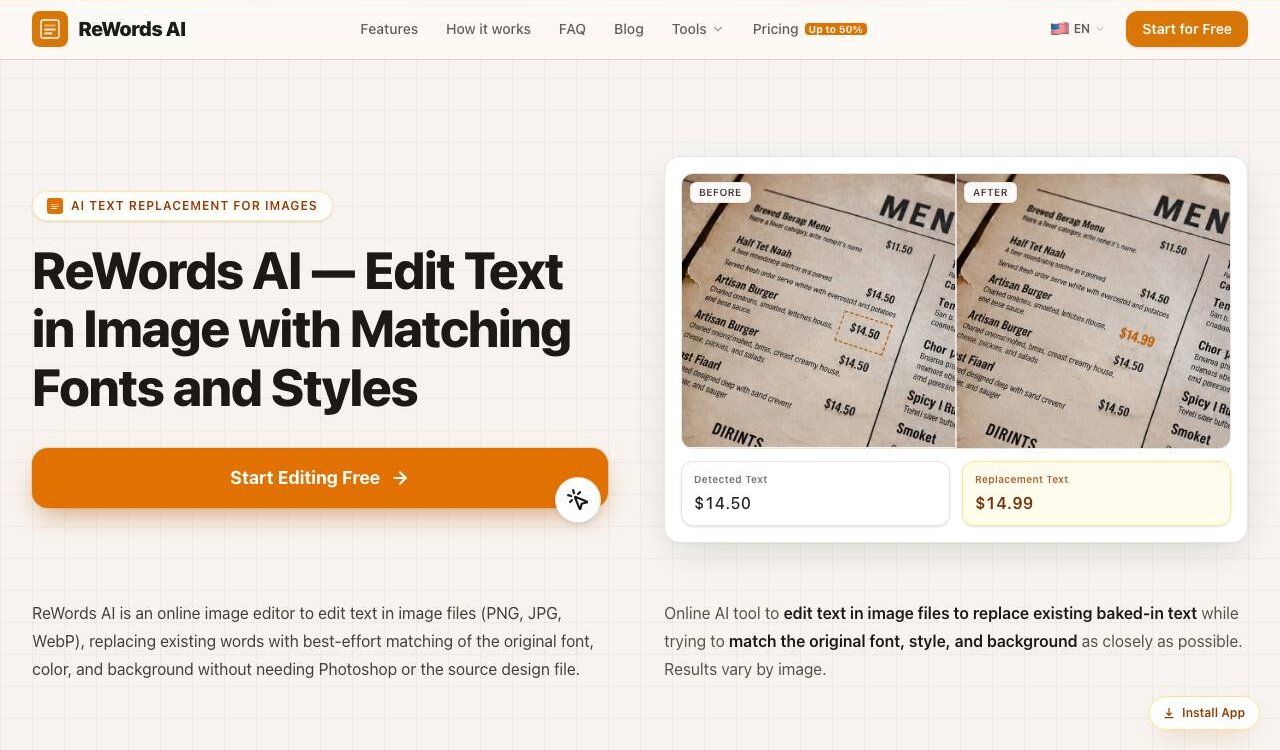
Two days after the flyer went out, the gig moved to Friday. The design file sits on someone else's laptop, or it never existed because an AI drew the picture. With ReWords AI, the words baked into a PNG, JPG or WebP image can change anyway. The old letters are cleared from the background, and the new wording is set in a style close to the original.
After an upload in the browser, the tool marks the text it finds, and you click a block to type the replacement. Words it missed can be boxed by hand, and several text areas in one picture change in a single run. The site calls the match a best effort: printed lettering comes out most consistent, while handwriting and ornate script are harder to recognise.
According to the privacy policy, uploaded images go to outside text-recognition and image-editing models to carry out each edit. Editing needs a sign-in by email or Google. Besides swapping words, the workspace can take text out of a picture or translate it into another language while keeping the layout.
Good fit if you…
- have a finished image with a typo or an outdated date
- need to fix misspelled words in AI-generated pictures
Made ReWords AI? Get the badge
You're welcome to show the listing on your site. It's optional and free, and nothing about the listing depends on it.

Share the listing
More in Design, Photo & Video
See all →
CADProps
Open a 3D design file in the browser and read its size, volume and weight

Morie
Remove the wavy rainbow stripes from photos of screens and scanned prints

AI Icon Creator
Make an app icon from a few words and download it in every size the stores ask for

Client Review Desk
Collect client comments and approvals on each round of design images through a shared link

DishVivid
Brighten and crop photos of your real dishes for menus and delivery apps