AppScreen
Design App Store and Google Play screenshots as one strip, then export each slide
Forapp makers who prepare their own store pages Web
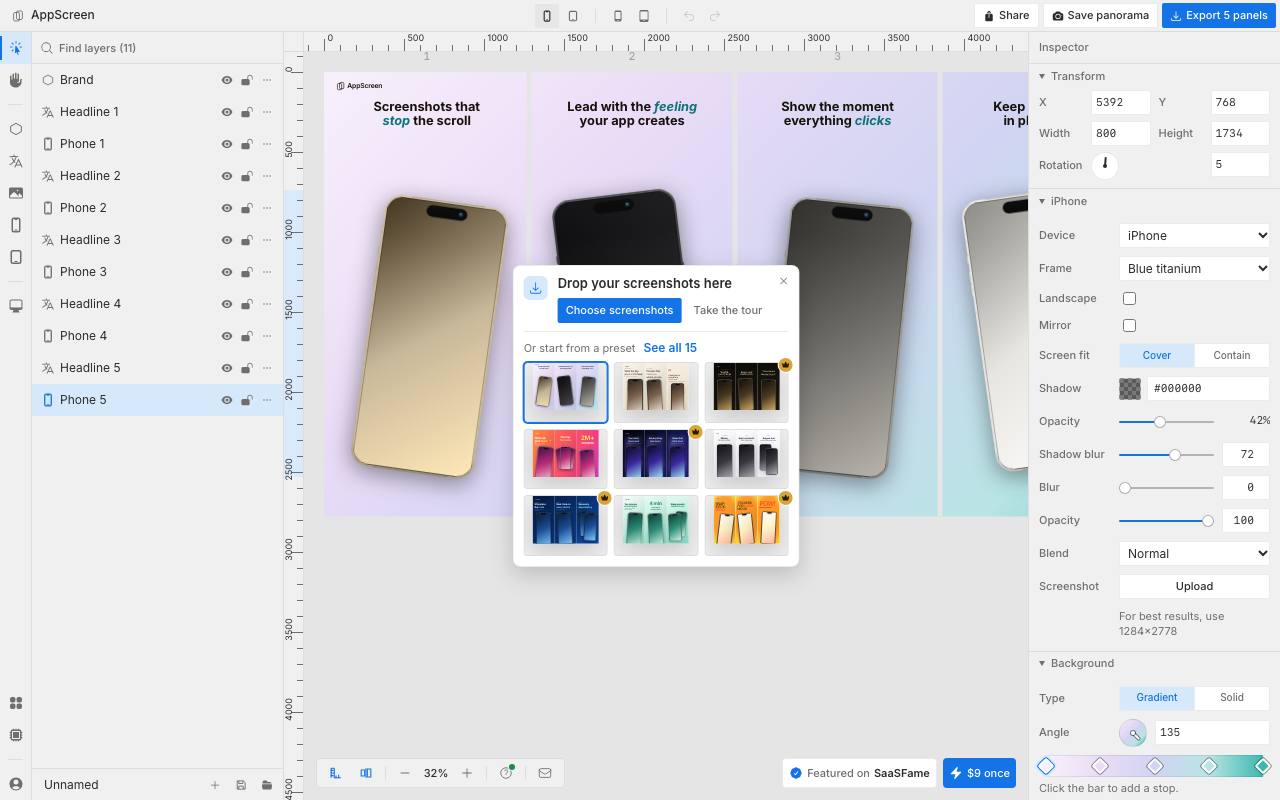
The phone in your design should lean into the next screenshot, and the tool cuts it off at the edge. Most design tools treat each App Store screenshot as a separate image, so a phone or a headline cannot run across the gap between two of them. The store shows the screenshots in a row, and AppScreen lays all the slides out on one wide canvas in the browser.
On export, it cuts the canvas into one PNG per slide at store size. The whole panorama can also be saved as a single image. You drop screens into iPhone, iPad or Android frames and place captions, backgrounds and logos anywhere on the canvas. Projects stay in the browser unless you move them to the cloud. There, viewers open share links without an account, and a version history is kept for 30 days. Claude Code and Cursor can also design on the canvas over MCP. Next to the editor, the site offers separate iPhone mockup and app icon generators.
Good fit if you…
- want a device or headline to run across two screenshots
- publish the same app on the App Store and Google Play
Made AppScreen? Get the badge
You're welcome to show the listing on your site. It's optional and free, and nothing about the listing depends on it.

Share the listing
More in Design, Photo & Video
See all →
CADProps
Open a 3D design file in the browser and read its size, volume and weight

Morie
Remove the wavy rainbow stripes from photos of screens and scanned prints

AI Icon Creator
Make an app icon from a few words and download it in every size the stores ask for

Client Review Desk
Collect client comments and approvals on each round of design images through a shared link

DishVivid
Brighten and crop photos of your real dishes for menus and delivery apps